
Original demonstration / Single-module scope
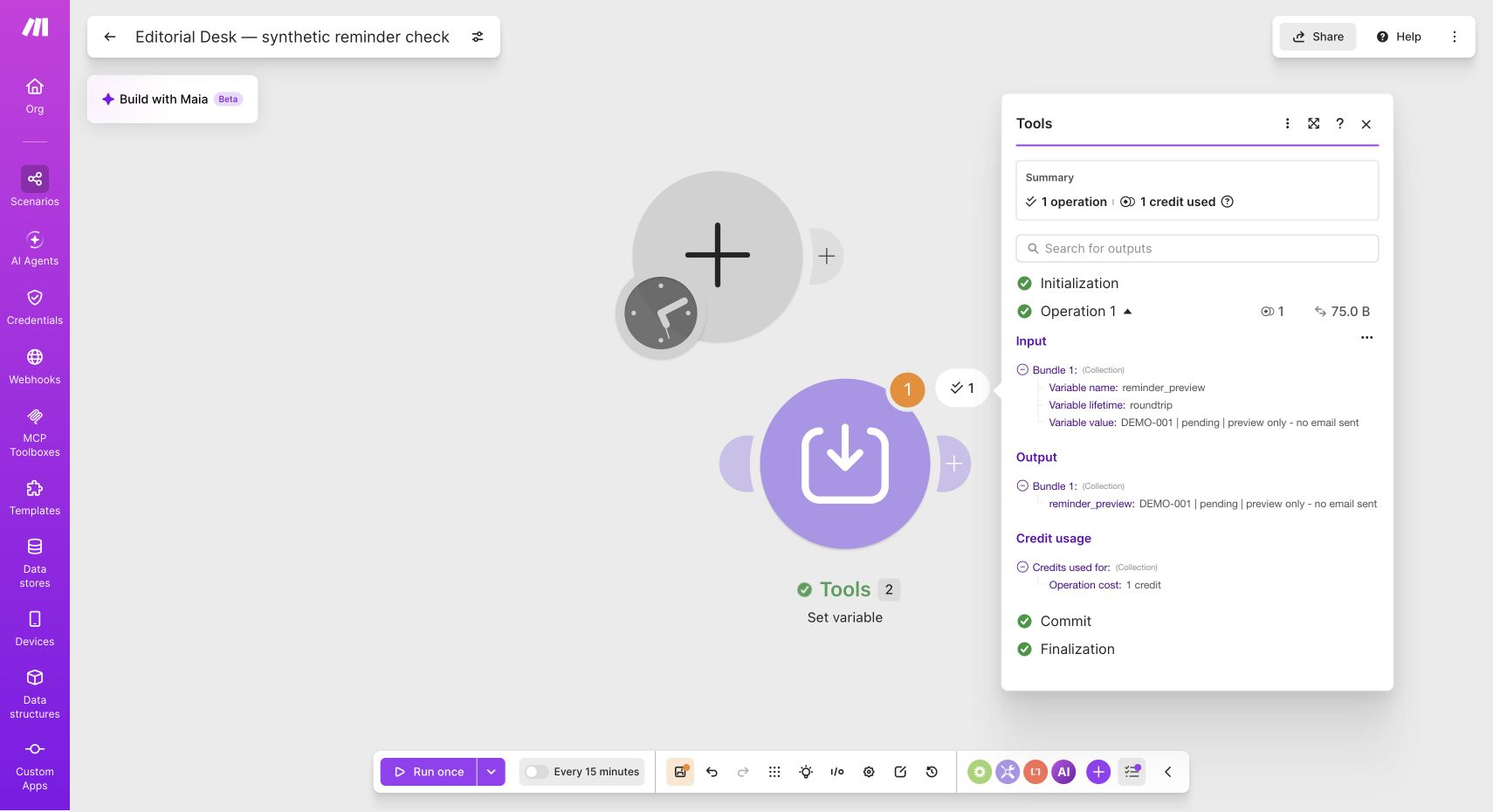
A synthetic preview, run in Make.
We ran the Tools → Set variable module using “Run this module”. Its output was reminder_preview = DEMO-001 | pending | preview only - no email sent. The run interface showed 1 operation and 1 credit.
Make a useful draft before automating delivery
For a small service business collecting files or approvals, begin with one weekly draft that lists exactly what is outstanding. Have a person check it before sending. The first goal is a correct list, not maximum message volume.
This is a workflow design based on Make documentation, not a working scenario export or a tested client deployment. The downloadable PDF contains fictional cases and expected outcomes so you can evaluate an implementation without uploading client material.
Define the record before choosing modules
Choose one timezone and one definition of overdue. A date with no time should not become overdue at a surprising hour because two systems use different timezones. Group by a stable client identifier, not a display name that two people may share.
| Field | Purpose | Example |
|---|---|---|
| request_id | Stable identity for one requested item | REQ-001 |
| client_id and email | Group the right recipient's items | DEMO-A / alex@example.com |
| status | Decide whether the item still needs attention | pending, received, cancelled |
| due_date | Keep future items out of the overdue list | 2026-09-10 |
| last_draft_batch | Recognize a previously handled weekly batch | 2026-W37 |
| item_label | Tell the recipient what is actually missing | September attendance list |
The proposed processing order
- Read the request table and reject rows missing an identifier, valid status, recipient, or due date. Send rejected rows to a review list.
- Select pending items due before the chosen cutoff. Exclude received and cancelled items.
- Group by client, then create a consistent batch key from the client identifier and reporting week. Check whether that draft already exists.
- Create one draft with explicit item names and an owner for review. Save the returned draft identifier and batch key.
- Immediately before sending, recheck the current item statuses. Someone may have supplied a file after the weekly draft was prepared.
- Record approval and send status separately. A draft being created is not evidence that a message was delivered.
A retry must not create a second reminder
A failure can occur after a mail service creates a draft but before the spreadsheet records its identifier. Blindly repeating the create step can duplicate it. Your implementation needs a way to locate an existing draft using its stable batch reference, or to stop for human reconciliation when the outcome is uncertain.
Make's incomplete-execution feature can retain unfinished runs and support resolution; the documentation says it is disabled by default. Enabling it is not proof that a workflow is safe to retry. Decide what every side effect means before selecting an error handler.
| Test case | Expected behavior |
|---|---|
| Same batch runs twice | Existing draft is reused or second attempt is stopped |
| Item marked received before run | Item is absent |
| Item arrives after draft creation | Reviewer removes it before delivery |
| Two clients share a display name | Their records stay separate |
| Email service returns an ambiguous error | Review queue; no blind repeated sending |
Keep the first demonstration inexpensive
Make Free lists 1,000 credits a month and a 15-minute minimum scheduled interval. A weekly synthetic demonstration does not need fast polling. Credits depend on the actions actually executed; one workflow run does not necessarily equal one credit.
Measure a representative run, including searches, each processed row, draft creation, record updates, and retries. Multiply by the planned schedule, then leave headroom for errors. A free Make account does not make a connected mailbox, API, or business application free.
What this process cannot solve
Automation cannot make an unresponsive client cooperate or determine whether an uploaded document is complete. Keep financial judgments and document validation outside this administrative reminder design. Start with fictional data and the smallest useful scope. Publish a live scenario only after its actual modules, permissions, credits, and exception handling have been verified.
Watch demos / Official walkthroughs
See how the tools work.
Videos load from YouTube only when you press play. These are provider videos, not our own product tests.

Make / Official video
Make—Building Your First Automated Workflow from Scratch
What to look for: Follow how modules connect and how data moves through the first workflow.
Watch on YouTubeYour next step / Review the option
Make
A visual tool to investigate small workflow designs, beginning with synthetic data and human review.
Free plan includes 1,000 credits/month
Connected apps can cost extra. Free scheduled interval is at least 15 minutes; paid billing must be checked at checkout.
Affiliate link: we may earn a commission on an eligible purchase. Link disclosure
Questions before you decide
Can I try a weekly reminder workflow on Make Free?
Make lists 1,000 credits per month and a minimum scheduled interval of 15 minutes on Free. Weekly scheduling is compatible with that interval, but the credit allowance must cover the actual actions, rows, and errors. Connected apps may have separate charges.
Will retrying a failed run prevent duplicate reminders?
No. A draft may have been created before an error was reported. This design checks an existing batch before creating another draft and requires reconciliation after an ambiguous error. Make's incomplete-execution feature can preserve a failed run; it does not prove a retry is duplicate-safe.
Sources & verification
Product details and prices can change. Check the linked provider before buying.
- Make pricing and free-plan limits Accessed 2026-09-13
- Make incomplete executions Accessed 2026-09-13
- Make Academy: incomplete executions Accessed 2026-09-13
Sources link directly to providers. Product buttons may use separately labeled affiliate links. Read our disclosure.